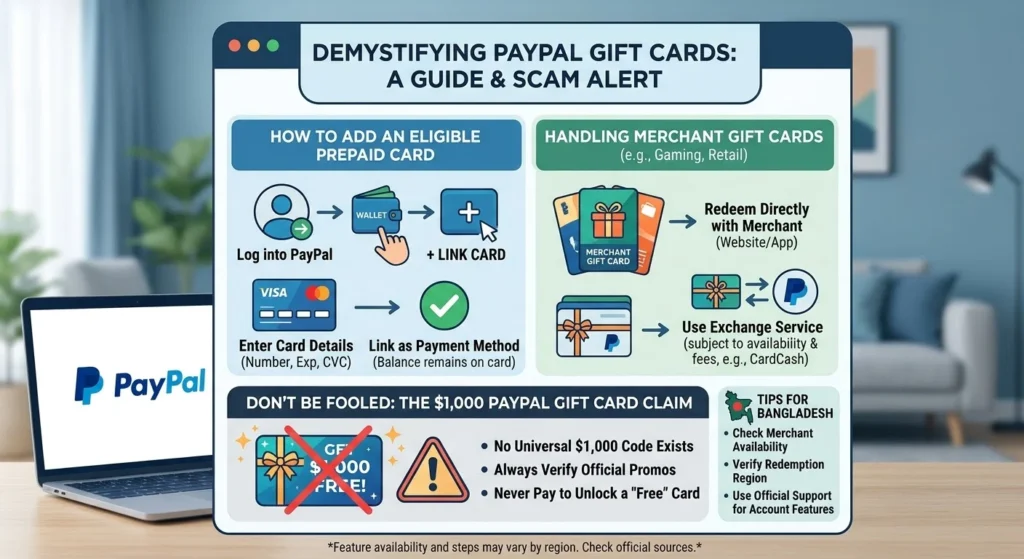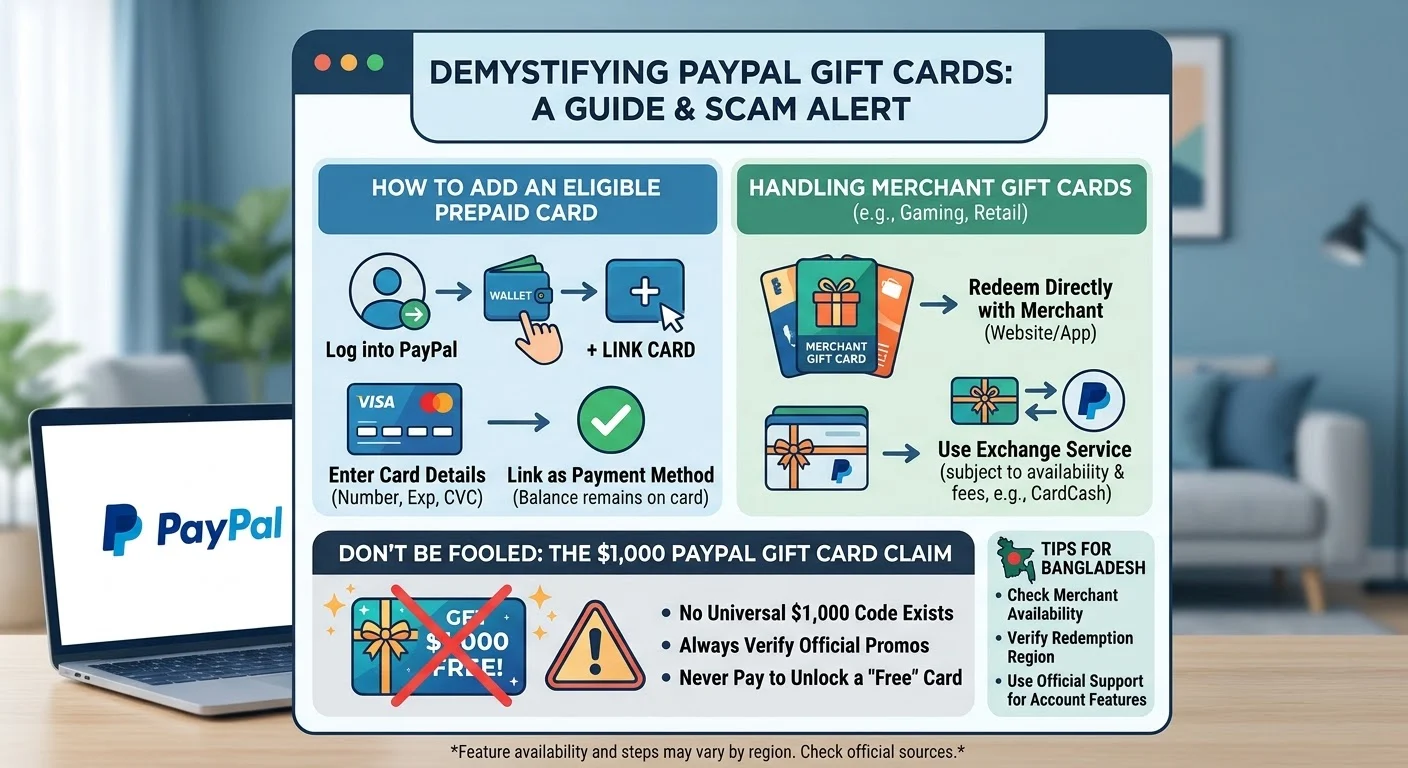
Meta Description: Learn how to add a PayPal Gift Card, redeem gift cards, explore $1,000 gift card claims, and avoid common scams.
Focus Keyword: PayPal Gift Card
Secondary Keywords: how to add a gift card to PayPal, $1,000 PayPal Gift Card, redeem a gift card, PayPal gift card balance, PayPal gift card scams
Introduction
Are you looking for a $1,000 PayPal Gift Card or trying to learn how to add a gift card to your PayPal account? Understanding how PayPal handles gift cards can help you avoid confusion and protect your money.
Many people search online for PayPal gift cards because they want to shop online, send gifts, or find convenient ways to pay. However, gift cards come in different forms, and each type follows its own rules.
First, we need to clarify one important point. PayPal generally does not offer a universal gift card that you can redeem for $1,000 directly into any PayPal account. PayPal does offer gift card purchasing options in supported markets, and some third-party services may let eligible users exchange certain merchant gift cards for PayPal funds.
These options have different requirements. Therefore, we should identify the type of card before trying to add it.
In this guide, we explain how to add a gift card to PayPal, how to check whether a card qualifies, what to know about $1,000 gift card offers, and how to protect your account.
What Is a PayPal Gift Card?
A PayPal Gift Card is a term people often use when searching for gift cards they can purchase through PayPal or use alongside their PayPal accounts.
However, this phrase can describe several different things. Understanding the differences will help you choose the right option.
1. Merchant Gift Cards
Merchant gift cards hold a specific value that you can spend at a particular business.
For example, you might receive a gift card for an online retailer, gaming platform, restaurant, or entertainment service.
You generally redeem these cards through the merchant’s official website or app. You cannot automatically transfer their value into your PayPal balance.
2. Prepaid Visa or Mastercard Gift Cards
Some prepaid gift cards carry a Visa or Mastercard logo. Depending on the issuer’s rules, you may be able to use an eligible card for online purchases.
You might also be able to link certain prepaid cards to PayPal.
However, linking a prepaid card does not transfer its money into your PayPal balance. It simply makes the card available as a payment method when PayPal and the card issuer permit its use.
3. PayPal Digital Gift Cards
In supported markets, PayPal provides a digital gift card store where eligible customers can purchase gift cards from participating merchants.
The customer pays through PayPal, and the recipient uses the gift card according to the merchant’s terms.
You can learn more through the official PayPal Digital Gift Card Help Center.
These gift cards are different from money that someone can automatically deposit into a PayPal account.
Is There a Real $1,000 PayPal Gift Card?
The phrase $1,000 PayPal Gift Card attracts attention because it suggests that someone can receive $1,000 in free spending money.
However, we should distinguish between a real promotional offer and an unsupported online claim.
PayPal’s official gift card store allows eligible customers to purchase selected merchant gift cards. That does not mean PayPal provides a universal $1,000 gift card code that anyone can redeem for free money.
Some websites advertise free gift card codes, instant rewards, or large cash prizes. These claims require careful verification.
How to Verify a $1,000 Gift Card Offer
Before accepting an offer, follow these steps. <<<.ADD A $1000 PAYPAL GIFT CARD >>>
- Check the source. Visit PayPal’s official website instead of relying on a random social media post.
- Read the offer terms. Look for eligibility rules, expiration dates, geographic restrictions, and redemption instructions.
- Verify the promotion. Confirm that the promotion appears on an official PayPal page or comes from a clearly identified, authorized partner.
- Never pay a release fee. A demand for an advance payment to unlock a supposed free gift card is a serious warning sign.
- Protect your login details. Never give your PayPal password or one-time verification code to someone offering a reward.
A legitimate offer should have clear terms and a verifiable source. If you cannot confirm those details, do not enter personal information or payment details.
How to Add a Gift Card to PayPal
The process depends on whether you have a prepaid payment card or a merchant gift card.
If you have an eligible prepaid Visa or Mastercard, you may be able to link it to your PayPal wallet. If you have a store-specific gift card, you generally need to redeem it with that store.
Step 1: Log In to Your PayPal Account
Visit the official PayPal website or open the official PayPal app.
Enter your login information and complete any security verification that PayPal requests.
Always check that you are using the genuine PayPal service. Avoid logging in through links sent by strangers.
Step 2: Open Your Wallet
After logging in, look for the Wallet section.
On the website, this section helps you manage payment methods linked to your account.
The exact layout may vary depending on your country, device, and account type.
Step 3: Select the Option to Link a Card
Look for an option such as Link a card or Link a debit or credit card.
Select it if the option appears in your account.
If you cannot find it, check PayPal’s official help resources for your region.
Step 4: Enter the Prepaid Card Details
If PayPal accepts your card type, enter the requested information.
This may include:
- The card number
- The expiration date
- The security code
- The billing address, if requested
Enter the details exactly as the card issuer provides them.
Some prepaid cards do not support PayPal linking. Others require activation or registration before online purchases.
Step 5: Complete Any Verification
PayPal or the card issuer may request additional verification.
Follow the instructions shown in your account. If the card fails verification, contact the issuer or PayPal through its official support channel.
Important: Adding a prepaid card to PayPal does not convert the card’s balance into PayPal funds. The card remains a separate payment method.
Can You Add a Store Gift Card Directly to PayPal?
In most cases, you cannot add a store-specific gift card directly to your PayPal balance.
For example, a gift card issued by a gaming company or online retailer usually works only within that company’s supported payment system.
You should follow the redemption instructions printed on the card or included in the delivery email.
What Should You Do With a Merchant Gift Card? <<<.ADD A $1000 PAYPAL GIFT CARD >>>
Follow these steps:
- Identify the company that issued the card.
- Visit its official website or app.
- Find the gift card redemption section.
- Enter the card code and PIN if required.
- Check the available balance.
- Use the balance according to the merchant’s terms.
If the merchant accepts PayPal at checkout, you may be able to use PayPal for other parts of the purchase. However, that does not mean the merchant gift card has become PayPal balance.
How to Convert an Eligible Gift Card Into PayPal Funds
Some gift card exchange services offer eligible users a way to exchange certain merchant gift cards for money.
The service may pay an agreed amount to a supported PayPal account. However, not every gift card qualifies, and the exchange amount may be lower than the card’s face value.
PayPal’s US help documentation has described a CardCash exchange option for certain unwanted merchant gift cards. Availability and eligibility can change, so check the current terms before proceeding.
You can start by reviewing the relevant PayPal gift card guidance.
Step 1: Check Whether the Exchange Service Accepts Your Card
Visit the exchange provider through a verified source.
Search for the merchant that issued your card and check whether the service accepts that card type.
Step 2: Review the Offer
If the service accepts your card, it may provide an exchange quote.
For example, a card with a face value of $100 might qualify for an offer below $100.
The actual amount depends on the provider’s terms and the specific card.
Step 3: Read the Fees and Conditions
Before accepting an offer, check the payout method, processing time, refund policy, and any applicable fees.
Never assume that the provider will pay the full card value.
Step 4: Complete the Exchange Through the Verified Service
If you decide to proceed, follow the provider’s official instructions.
Only submit the information required for the transaction. Never disclose your PayPal password, one-time verification code, or account recovery details to the exchange provider.
Step 5: Confirm the Payment
After completing the transaction, check your PayPal account directly.
Do not rely solely on an email, screenshot, or message claiming that the funds have arrived.
If the payment does not appear, contact the service through its verified support channel.
How to Buy a Gift Card Using PayPal
You may want to use PayPal to purchase a gift card instead of adding an existing card to your account.
In supported markets, PayPal’s digital gift card store offers selected cards from participating merchants.
The process generally follows these steps.
- Visit the relevant PayPal gift card store.
- Browse the available merchants.
- Select a gift card.
- Choose an available denomination.
- Enter the recipient’s email address if you are sending the gift to someone else.
- Review the order details.
- Sign in to PayPal and complete the payment.
- Check your email for the gift card delivery message.
Gift card availability depends on the country, merchant, and applicable terms.
Before buying, confirm that the recipient can redeem the card in their country. Some gift cards have regional restrictions and may not work outside their intended market.
How to Check a PayPal Gift Card Balance
The correct method depends on the type of gift card you own.
Checking a Merchant Gift Card
Visit the issuer’s official website.
Look for an option such as Check Balance, Gift Card Balance, or Manage Gift Card.
Enter the requested details, which may include the gift card number and PIN.
The website should display the remaining balance if the card supports online balance checks.
Checking a Prepaid Card
For a prepaid Visa or Mastercard, use the card issuer’s official website or customer service number.
You can also check whether PayPal successfully linked the card by opening your Wallet and reviewing your payment methods.
Remember that the balance shown by the card issuer may not appear as money in your PayPal account.
Checking a PayPal Payment
If you exchanged a gift card through a supported service, sign in to PayPal independently.
Open your account activity and look for the relevant transaction.
If you cannot find the payment, check its status before contacting customer support.
Why Can’t You Add a Gift Card to PayPal?
Sometimes, PayPal rejects a card or does not display the expected linking option.
Several issues may explain the problem.
The Card Is Not Supported
PayPal does not accept every prepaid or gift card.
A merchant gift card designed for one store generally cannot function as a general-purpose PayPal payment card.
The Card Has Not Been Activated
Some prepaid cards require activation before you can use them online.
Follow the issuer’s activation instructions before trying again.
The Billing Information Does Not Match
A prepaid card may require a registered billing address.
If the information does not match the issuer’s records, the transaction may fail.
The Card Has Insufficient Funds
Some transactions require enough available funds to cover the purchase and any applicable authorization amount.
Check your card balance before trying again.
Your Country Has Different Features
PayPal features vary by country.
A linking option or gift card service available to a US customer may not be available to a customer in Bangladesh or another market.
Check your account’s available features instead of assuming that every online tutorial applies to your country.
PayPal Gift Card Scams: Warning Signs to Know
Searches for free gift cards often lead users to websites that promise rewards in exchange for personal information, surveys, or advance payments.
Some offers may be legitimate promotions. Others may attempt to steal money or account details.
We should always verify an offer before trusting it.
1. Requests for an Activation Fee
Be cautious if someone claims that you must pay a fee to unlock a free $1,000 PayPal Gift Card.
Do not send money merely because a stranger promises to release a reward.
2. Requests for Your PayPal Password
A legitimate gift card redemption process should not require you to reveal your PayPal password to another person.
Never share your password or one-time security code through chat, email, or social media.
3. Fake Gift Card Generators
Websites that claim to generate unlimited working gift card codes may use these promises to collect personal information or encourage unsafe downloads.
Avoid entering sensitive information into such sites.
4. Fake Payment Screenshots
A screenshot does not prove that a payment has reached your account.
Open PayPal directly and check your transaction history.
5. Urgent Messages and Threats
Scammers may claim that an offer expires within minutes or that your account will be blocked unless you act immediately.
Take your time and verify the claim through an official support channel.
For additional account safety information, visit the PayPal Security Center.
Can You Get a Free $1,000 PayPal Gift Card?
You may encounter promotions that advertise a $1,000 reward. However, you should not assume that these promotions are genuine or that everyone qualifies.
A legitimate giveaway should identify its sponsor, explain the eligibility requirements, provide clear terms, and describe how the winner receives the prize.
Check the following details before participating:
- The identity of the organization running the promotion
- The official rules and closing date
- The countries and ages eligible to participate
- Any purchase or participation requirements
- The method used to select and notify winners
- The exact form of the reward
Avoid websites that guarantee a free $1,000 PayPal Gift Card in exchange for your password, verification code, or an advance payment.
If you find no reliable evidence that PayPal or an authorized sponsor runs the promotion, treat the offer as unverified.
Using PayPal Gift Cards Safely for Online Shopping
Gift cards can make online shopping and gifting easier when you understand their limitations.
Before using a card, follow a few basic precautions.
First, check the merchant’s terms. Some cards expire, carry restrictions, or work only in certain countries.
Second, keep your receipt. Save the purchase confirmation and delivery email until you have redeemed the card successfully.
Third, protect the code. Anyone who obtains an unused gift card code may be able to redeem it, depending on the card’s rules.
Fourth, check the payment method. If a merchant accepts PayPal, confirm which payment methods are available at checkout.
Finally, monitor your account. Review your PayPal activity and report transactions you do not recognize.
These simple steps can help reduce the risk of losing money through fraudulent offers or unauthorized gift card use.
PayPal Gift Card Availability in Bangladesh
People in Bangladesh may find online offers for PayPal gift cards, but availability requires special attention.
PayPal’s services and features differ by country. A gift card store or account feature available in the United States may not be available in Bangladesh.
Before purchasing a gift card, verify that the issuing merchant accepts customers in Bangladesh and that you can redeem the card from your location.
Also, check whether the merchant requires a payment method, billing address, or account registered in another country.
Do not provide a false address or use someone else’s account information to bypass geographic restrictions.
If you already own a gift card, contact the issuing merchant through its official website to confirm whether you can redeem it from Bangladesh.
For PayPal account questions, use the official PayPal Help Center and check the services available to your account.
Frequently Asked Questions About PayPal Gift Cards
1. Does PayPal Give Everyone a Free $1,000 Gift Card?
No. There is no basis for assuming that every PayPal user can claim a free $1,000 gift card. Verify any advertised promotion through PayPal or the identified sponsor’s official website before participating.
2. Can I Transfer a Visa Gift Card Balance Into PayPal?
Linking an eligible Visa gift card to PayPal does not automatically transfer its balance into your PayPal wallet. You may be able to use the card as a payment method if PayPal and the card issuer support it.
3. Do PayPal Gift Cards Expire?
The answer depends on the specific gift card. Merchant gift cards and prepaid cards follow their issuers’ terms. Check the card documentation for expiration dates, fees, and other restrictions.
4. What Should I Do if My Gift Card Code Does Not Work?
First, confirm that you entered the code correctly and that the card has been activated if required. Then check the remaining balance and redemption restrictions. If the problem continues, contact the card issuer through its official support channel.
5. Can Someone Send Me a PayPal Gift Card From Another Country?
A person may be able to purchase or send certain digital gift cards internationally, but the issuer may restrict where the recipient can redeem them. Check the card’s country restrictions before accepting or purchasing it.
Conclusion
Learning how to add a PayPal Gift Card starts with identifying the type of card you have. Eligible prepaid Visa or Mastercard cards may work as linked payment methods, while merchant gift cards generally require redemption through the issuing business. Some exchange services may convert eligible merchant gift cards into PayPal funds, subject to their terms and fees. As for the $1,000 PayPal Gift Card, always verify the source before trusting a promotional claim. PayPal’s gift card purchasing options do not establish that a universal $1,000 redemption code exists. By checking official information, protecting your account details, and avoiding offers that demand advance payments, you can make safer decisions when buying, redeeming, or exchanging gift cards <<<.ADD A $1000 PAYPAL GIFT CARD >>>